Daily reports
A daily report parents actually read
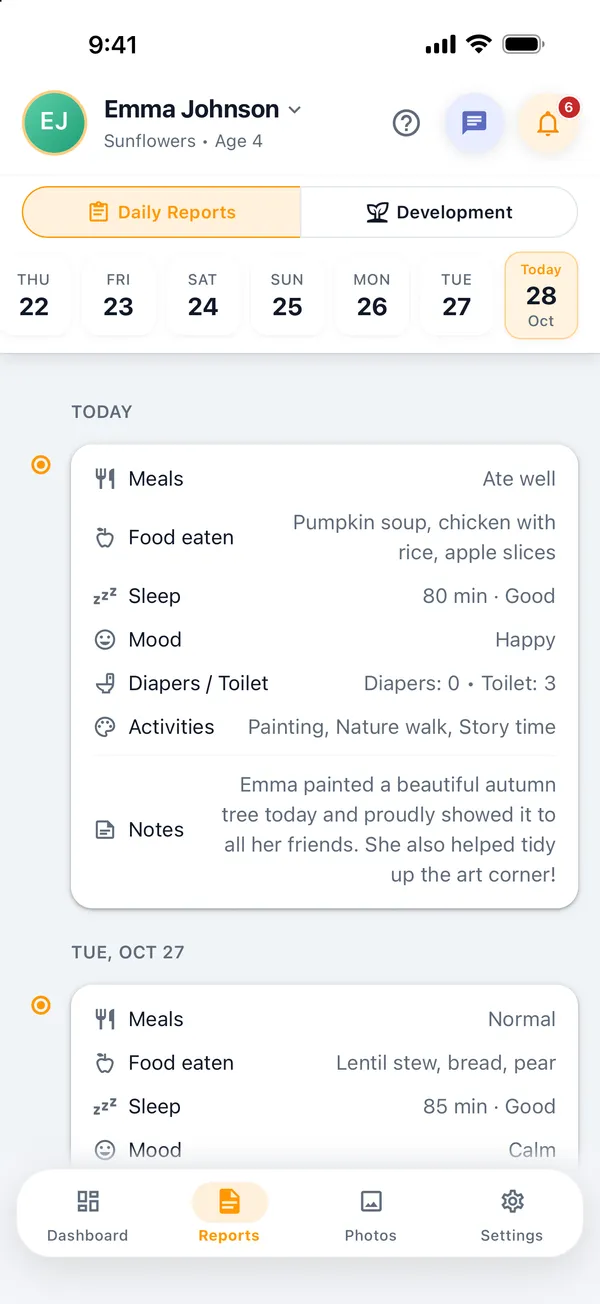
Meals, sleep, mood, hygiene and activities in one short report for each child. Teachers fill it in on their phone with a few taps, and parents get a notification as soon as it is published.
Run a kindergarten? Start free for 14 days
- Quick taps, little typing
- Notification when published
- Every past day saved
What's in a report
Everything parents ask about at pickup
Meals
Ate well, normal or ate little, plus what the child ate. The teacher can fill it in from the day's menu.
Sleep
How long the child slept, with quick choices of 30, 60, 90 or 120 minutes, and how well they slept.
Mood and hygiene
Happy, calm, sad or excited, plus diaper changes and toilet visits for the little ones.
Activities and notes
Painting, outdoor play, story time and more, or an activity of your own, plus a personal note from the teacher.
How it works
From the classroom to the parent's phone
- 1
Fill in during the day
The teacher opens the child's report and taps the answers. It can be saved as a draft and finished later.
- 2
Publish
When the report is ready, the teacher publishes it. Parents only see published reports.
- 3
Parents read it
Parents get a push notification and can read today's report or go back to earlier days.
Questions
Common questions
Can parents see a report before it's finished?
No. Reports stay as drafts until the teacher publishes them. Only then can parents see them.
Can parents see the meal menu?
Yes. The admin or teachers can add the class menu for each day, and parents can see it in the app.
Do you also track a child's development?
Yes. Teachers can write weekly notes and a monthly assessment in five areas: motor skills, language, social-emotional, independence and cognitive. Parents get a notification when it is published, and the admin can turn this feature off.
Can parents see older reports?
Yes. Parents can pick any day from the calendar or scroll through their child's recent reports.
More features
What else MyKidTrack does
- AttendanceOne-tap check-in and check-out, with a notification for parents.Learn more
- Parent communicationPrivate chats and announcements instead of crowded group chats.Learn more
- Photos and videosPrivate photos and videos, seen only by the child's own parents.Learn more
- Fees and paymentsMonthly fees per child and teacher salaries, without a notebook.Learn more
Bring MyKidTrack to your kindergarten
Download the app, create your kindergarten and invite your first parents today. Free for 14 days.
Or start on the web